Onboarding & configuration
Numbers, users, teams, groups, permissions and distribution rules: design and configure the right organisation for your calls.
Documented configuration and support with adoption.
 Talk to an expertFR
Aircall / Integration & optimisation
We configure Aircall, design your call journeys and connect your telephony to Zendesk and your CRM.
Talk to an expert
Scope depends on your processes, licences, permissions and available connectors.
Telephony within your organisation
We design numbers, groups, responsibilities, call journeys and information flows together. Aircall, Zendesk and your CRM are considered in the context of your needs and the capabilities of each tool.
Numbers, users, teams, groups, permissions and distribution rules: design and configure the right organisation for your calls.
Documented configuration and support with adoption.
Welcome messages, IVR, opening hours, queues, overflow and voicemail: configure and test the scenarios you need.
Clear call journeys, including when a team is unavailable.
Define the connections, useful data and follow-up rules between Aircall and your CX environment.
Configured integrations and verified end-to-end scenarios.
Review your configuration, call journeys and working practices to identify friction and prioritise changes.
Targeted recommendations and a roadmap.
Plan the prerequisites, carrier coordination, tests and cutover with your teams.
A transition shaped around the constraints of your numbers.
Train agents, supervisors and administrators, then adjust call journeys and integrations as your needs evolve.
Practical documentation and teams ready to use the tools.
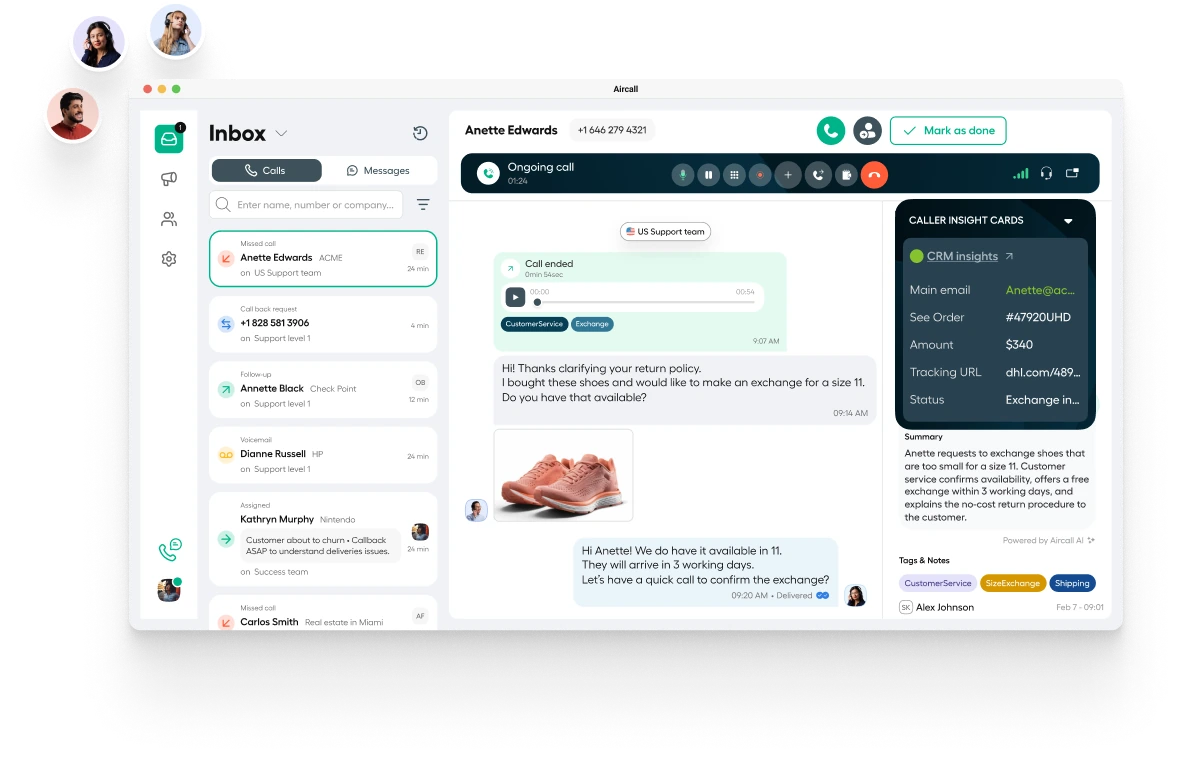
Calls, teams and customer context, connected to your working environment.
Official Aircall product demonstration.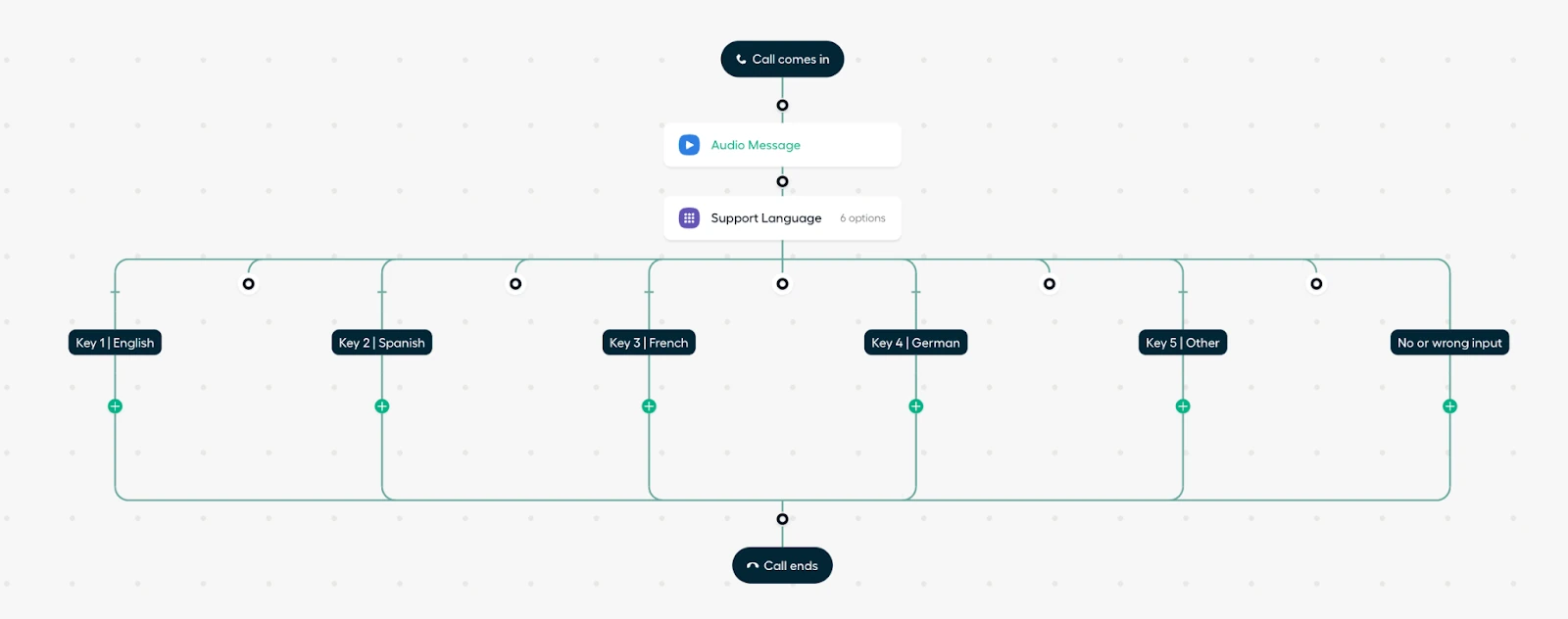
We design the scenarios, configure the branches and test the journeys.
Official Aircall example, without OmyCare client data.Aircall + Zendesk + CRM
Call logging, ticket creation rules and missed-call follow-up.
Useful customer information, activities to record and mappings supported by the connector.
Responsibilities, exceptions and acceptance scenarios defined before launch.
Scope depends on connectors, licences and permissions. Zendesk–CRM flows are scoped separately where needed.
Scope depends on your processes, licences, permissions and available connectors.
Partner perspectives / Aircall
Three perspectives on our expertise, collaboration and the projects we deliver together.
Omycare has developed genuine expertise across the entire chain: CRM structuring, Aircall telephony integration, support workflow optimisation — they understand how the tools fit together and, above all, how to help teams adopt them for the long term.
Translated from French
Their expertise in Aircall is excellent, projects run smoothly and the relationship is always straightforward and direct.
Translated from French
OmyCare is the most dynamic partner I have encountered: responsive, proactive with ideas, and always easy to work with, without the slightest friction.
Translated from French
Migration / Service continuity
We coordinate prerequisites, call journeys, tools and cutover arrangements to reduce transition risks and support the teams handling calls.
Map your teams, numbers, usage and service constraints.
Check eligibility, prepare the documents and coordinate timing with carriers.
Build IVR, routing, groups, schedules and overflow.
Configure Aircall–Zendesk and CRM exchanges to match the agreed rules.
Check inbound and outbound calls, unavailable-team scenarios and records in connected tools.
Prepare agents, supervisors and administrators before launch.
Confirm prerequisites, responsibilities and appropriate fallback arrangements.
Monitor the start, handle adjustments and hand over documentation.
Porting dates and conditions depend on carriers and number eligibility. We agree a cutover plan and feasible continuity measures without guaranteeing zero interruption.
After cutover, we can continue to adjust teams, schedules and Zendesk or CRM flows within an agreed scope. Already using Aircall? We also handle targeted improvements.
An example engagement
Illustrative scope. No client data or results.
Multiple teams, different opening hours and missed calls that need better follow-up.
Analyse flows, configure Smartflows, define handovers and set up follow-up in Zendesk.
Call journey map, configuration, acceptance scenarios and administrator documentation.
Client perspective / Lease a Bike
A big thank you to the OmyCare team for successfully integrating Aircall with our CRM!
Translated from French
Before we start
Yes. We can review call journeys, distribution rules, team organisation or a specific integration, based on your priorities.
We check portability eligibility, required documents and carrier constraints. Timing and cutover arrangements are agreed before the transfer.
Opening hours, IVR menus, destinations, overflow and fallback routes. We test open, closed and unavailable-team scenarios.
No. Scope depends on the connector, licences, permissions and business rules. We agree useful data and actions before configuration and testing.
Not automatically. Relevant uses, availability and licensing are assessed separately during scoping.
No. Aircall integration is a CX & Tech service. Your own teams can continue handling calls; outsourcing is a separate service.
Your next step
A deployment, new call journeys or an integration that needs attention? Let’s discuss your environment.
Talk to an expertAn initial conversation, with no obligation.